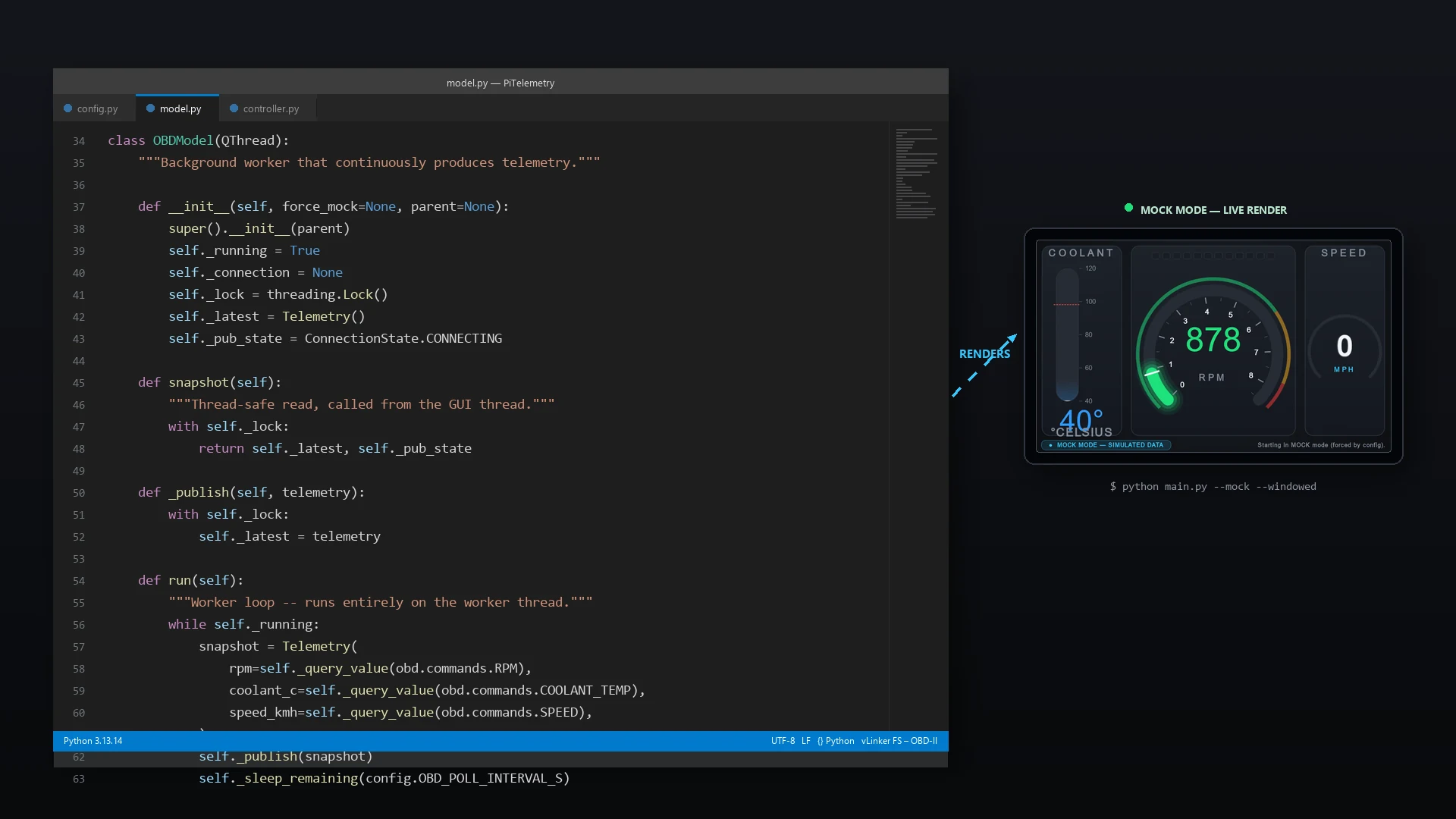
VS Code editor showing the dashboard model.py source alongside the running Lotus Elise digital dashboard in mock mode
← Telemetry — Software Module

Software & Communication Architecture

Asynchronous multi-threaded engine data ingestion and a live vector rendering pipeline — talking to a 20-year-old ECU without ever dropping a frame.

View Repository on GitHub
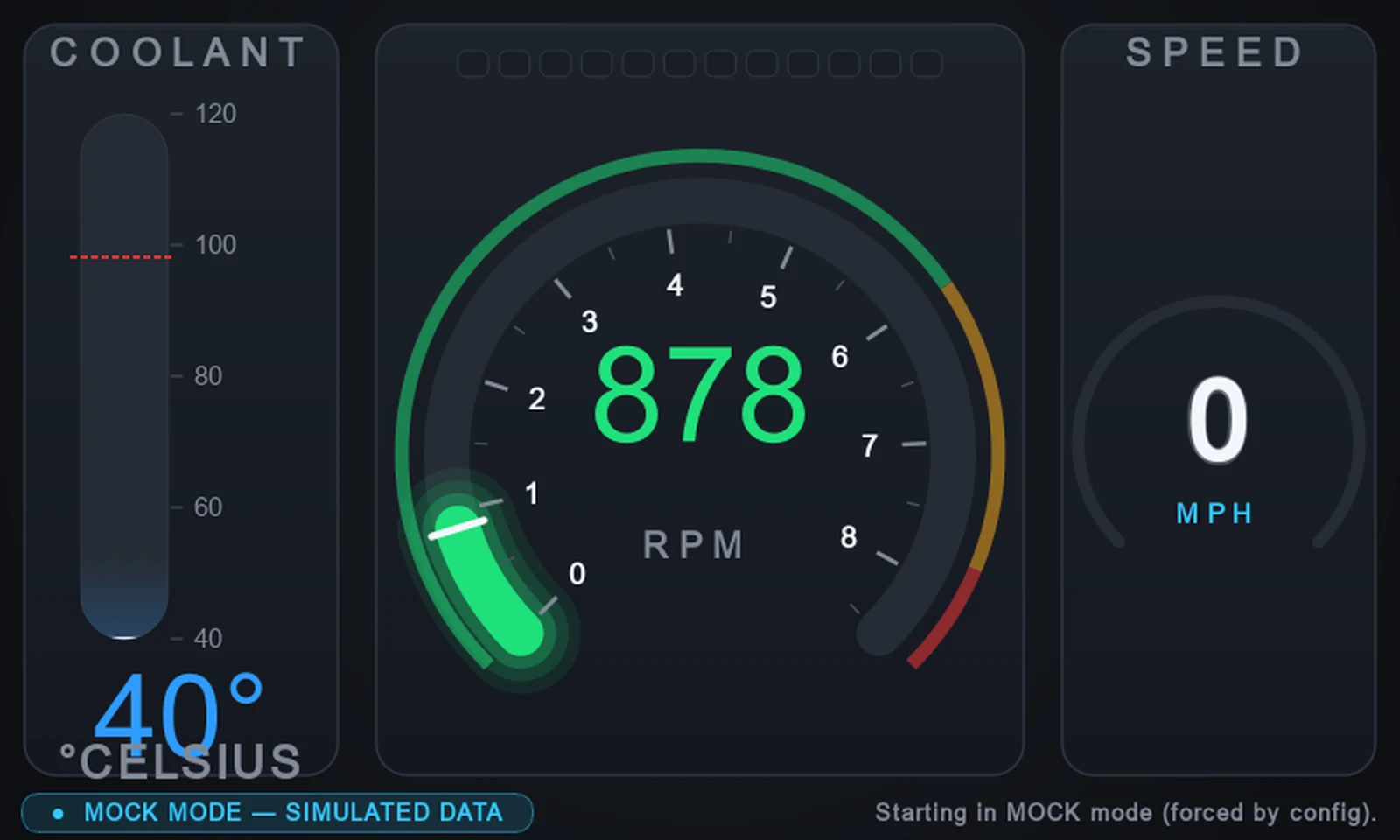
Dashboard running in mock mode with the tachometer sweeping through the amber power band
01

The Core Challenge

Talking to a factory ECU is a request-response affair over a slow serial link. Every query can block for tens of milliseconds, longer still during a dropout. Run that on the same thread as the graphics and the dashboard stutters, or freezes outright.

To hold a steady 60 FPS on the Raspberry Pi 5's VideoCore VII GPU, the software is built on a strict Model-View-Controller split. Data acquisition and rendering never share a thread, so a flaky adapter can never stall a needle sweep.

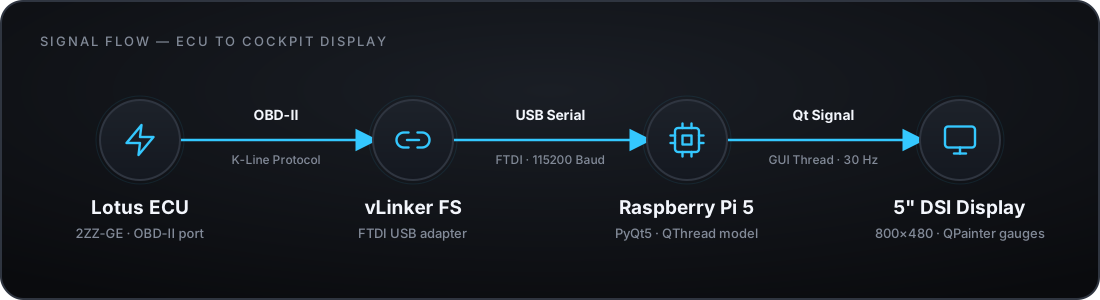
Data flow diagram: Lotus ECU to vLinker FS USB adapter, to Raspberry Pi 5 running PyQt5, to 5 inch DSI display
02

Architecture Breakdown

Four layers, each with exactly one job. The worker thread owns the serial link and nothing else — it never touches a Qt signal. The GUI thread owns every signal emission and every pixel painted, sampling the worker's latest reading on its own clock.

That separation is deliberate, not incidental: an earlier version emitted signals straight from the worker thread and hit a non-deterministic native crash under load. The publish-and-poll pattern below is what replaced it.

Model

Data Thread

QThread · python-obd

Owns the serial link on its own thread. Polls RPM, coolant and speed over /dev/ttyUSB0 without ever blocking the render loop.

Controller

Signal Router

QTimer · pyqtSignal

Samples the model's latest snapshot on the GUI thread at 30 Hz and fans it out into per-gauge signals — the only place a signal is ever emitted.

View

GUI Thread

QPainter

Draws the vector dials, progressive shift-lights and colour-coded thermal warnings, eased smoothly to 60 FPS.

Fail-Safe

Mock Mode

Async Mock Engine

Simulates a warming engine and a full rev sweep when no adapter is present, so development never depends on the car.

03

Live Telemetry Logic

Raw PID responses only matter once they're translated into something a driver can read at a glance, at speed.

Coolant Temperature PID 05 · COOLANT_TEMP

< 70°C Cold — still warming up
70–95°C Optimal operating temperature
≥ 98°C Overheating — flashing red + full-screen banner

Tachometer & Shift Lights PID 0C · RPM

0–6,000 Safe operating band
6,000–7,800 Power band
7,800–8,500 Shift now — progressive flash to magenta

Speedometer PID 0D · SPEED

OBD-II reports km/h natively. The dashboard converts live for the digital MPH readout:
vmph = vkm/h × 0.621371
A missing reading renders as a dim —— rather than a misleading zero.
04

Built to Survive a Flaky Serial Link

The worker thread never emits a signal. It parks its latest reading behind a lock; the GUI thread's timer reads it and does all the signal emission itself — inherently thread-safe, and immune to the serial link's jitter.

dashboard/model.py + controller.py
# Model layer — runs entirely on a worker QThread.
# Never touches a Qt signal: it just parks the newest reading behind a lock.
class OBDModel(QThread):
    def __init__(self, port="/dev/ttyUSB0"):
        super().__init__()
        self._lock = threading.Lock()
        self._latest = Telemetry()
        self._running = True

    def snapshot(self):
        """Thread-safe read, called from the GUI thread's timer."""
        with self._lock:
            return self._latest

    def run(self):
        connection = obd.OBD(self.port, fast=False)
        while self._running:
            snapshot = Telemetry(
                rpm=self._query(connection, obd.commands.RPM),
                coolant_c=self._query(connection, obd.commands.COOLANT_TEMP),
                speed_kmh=self._query(connection, obd.commands.SPEED),
            )
            with self._lock:
                self._latest = snapshot  # publish only — no signal here
            time.sleep(0.05)  # 20 Hz poll rate


# Controller layer — GUI-thread QTimer samples the snapshot at 30 Hz.
# This is the ONLY place a pyqtSignal is ever emitted.
class DashboardController(QObject):
    rpm_changed = pyqtSignal(object)

    def _poll(self):
        telemetry = self._model.snapshot()
        self.rpm_changed.emit(telemetry.rpm)
04B

Hardware Integration Hurdles

Translating theoretical code into a physical Lotus Elise cockpit revealed real-world serial protocol quirks that required targeted architectural fixes.

Serial Transport

Taming Auto-Scan Latency

Initial builds relied on python-obd's default auto-scan, which sequentially probes every available serial interface (including Bluetooth and system bus ports). In testing, this created a multi-second boot delay and occasionally left the vLinker FS adapter or the ECU's K-line session in a state that broke the next connection attempt.

Fix: Implemented direct port targeting via config.DEFAULT_PORT. The model now checks whether /dev/ttyUSB0 (Linux/Pi default, overridable via PITELEMETRY_PORT for macOS's /dev/cu.usbserial-*) actually exists on disk and tries it first at each configured baud rate, only falling back to a full auto-scan sweep if that fails.

K-Line Protocol

Handling 2ZZ ECU Sleep States

During initial vehicle debugging, the app frequently reported "Adapter Connected, Ignition Off" despite the key being turned. Investigation showed the Lotus 2ZZ ECU drops into a low-power sleep state over ISO 9141-2 (K-Line) if the engine isn't cranked within a couple of minutes of ignition-on.

Fix: Added a back-off reconnect loop that fully tears down and reopens the serial connection (fast=False, no command batching) rather than retrying a stale session. Each attempt re-runs python-obd's ELM327 initialisation handshake — the same K-line renegotiation that wakes the ECU once the engine actually fires.

Threading / Memory

Worker Signal Crash Resolution

Emitting pyqtSignal payloads directly from the serial worker thread at 20 Hz caused a non-deterministic native crash inside PyQt5's cross-thread signal marshalling — reproducible under sustained polling load, and the kind of bug that's nearly impossible to step through in a debugger.

Fix: Replaced active thread-pushing with a mutex-guarded snapshot buffer — the same publish-and-poll pattern used throughout this app. The worker only ever writes behind a lock; the GUI thread's own timer reads it on its own clock, so no signal, and no object, ever crosses the thread boundary.

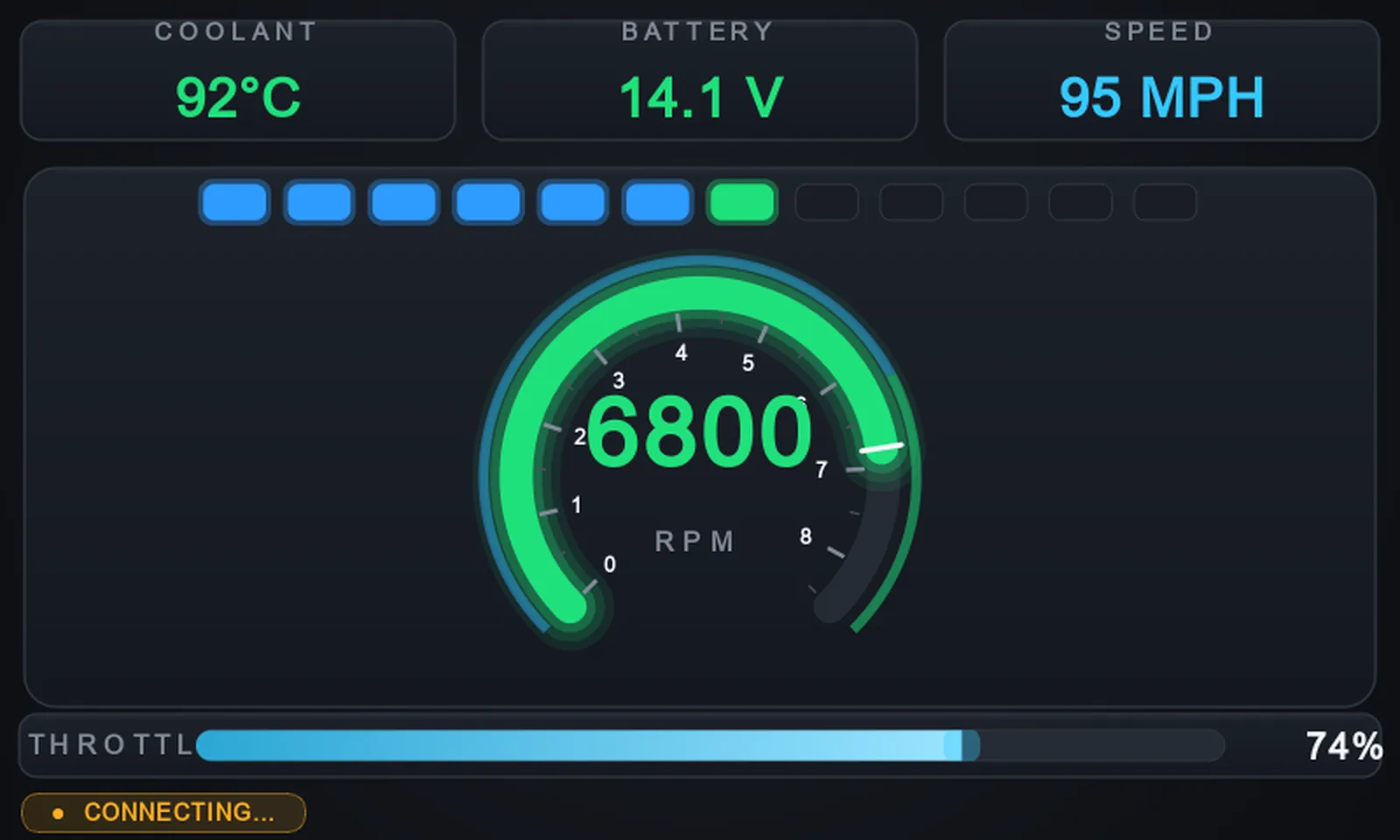
Track layout of the dashboard showing a dominant tachometer, compact coolant, battery and speed readouts, and a horizontal throttle bar
05

Dual-Layout Paradigm

The road-going three-gauge view isn't what you want staring back at you on a hot lap. A single --layout flag at launch swaps the entire HUD composition without touching a line of the model or controller code underneath.

--layout general (the default) keeps the original coolant bar / big tacho / digital MPH arrangement for road use. --layout track shrinks coolant, battery and speed to a compact top strip, hands the tachometer the bulk of the screen, and adds a horizontal throttle bar — everything a driver needs at a glance without hunting around the dial.

General Layout Road Use · Coolant Zones

< 70°C Cold
70–95°C Optimal
≥ 98°C Overheating

Track Layout Motorsport Use · Stricter Coolant Zones

< 84°C Still warming up
84–99°C Normal operating range
100–104°C Getting too hot
≥ 105°C Overheating — flashing red overlay

Track running keeps the 2ZZ hotter by design, so the Track layout's bands sit higher across the board — the General layout's thresholds are untouched, each layout owns its own zone table.

06

Emulated Development Engine

No adapter on /dev/ttyUSB0? No car? No problem. MockEngine stands in for the ECU so the entire UI and logic layer can be built, animated and demoed on a laptop.

Rather than freezing the dashboard with dead gauges away from the car, the Model falls back to MockEngine whenever no real adapter answers. It runs a small driver state machine — IDLE → ACCELERATE → CRUISE → DECELERATE — that shapes RPM and road speed the way an actual drive would: revs sweep up to a randomised shift point and bang down through an up-shift, cruise holds a steady band with small corrections, and deceleration eases back toward idle.

Coolant follows a first-order exponential warm-up curve from a cold ambient start toward ~90°C, with a scripted excursion above the critical threshold every minute or two so the flashing overheat overlay can be exercised on demand, then recovers on its own. Throttle position and battery voltage get the same treatment — eased toward phase-appropriate targets with light sensor-style noise — so nothing on screen ever looks like a static placeholder value.

The payoff: every visual state in this write-up — cold blue, optimal green, amber caution, flashing red, the full 0–8,500 RPM shift-light sweep — was built and verified entirely on a desktop, with python3 main.py --mock --windowed, before the dashboard ever saw the car.

07

The 2ZZ PID Discovery Phase

First live hook-up to the car: a Vgate vLinker FS (FTDI FT230X) adapter talking ISO 9141-2 K-Line at 115200 baud answered 28 mode-01 PIDs at a warm idle of ~945 rpm — no DTCs set.

PID Name Description Captured Value
010C RPM Engine RPM 943.5 rpm
0105 COOLANT_TEMP Engine coolant temperature 75 °C
010D SPEED Vehicle speed 0 km/h
0111 THROTTLE_POS Throttle position (absolute) 12.2 %
0142 CONTROL_MODULE_VOLTAGE Control module voltage 14.27 V
010F INTAKE_TEMP Intake air temperature 38 °C
0110 MAF Mass air flow rate 2.75 g/s
0104 ENGINE_LOAD Calculated engine load 20 %
010E TIMING_ADVANCE Ignition timing advance 2°
0114 O2_B1S1 O2 bank 1 sensor 1 voltage 0.72 V
0115 O2_B1S2 O2 bank 1 sensor 2 voltage 0.635 V
012F FUEL_LEVEL Fuel level input 23.1 %
0133 BAROMETRIC_PRESSURE Barometric pressure 101 kPa
0143 ABSOLUTE_LOAD Absolute load value 12.5 %

Adapter reported as ELM327 v2.3 at 13.9 V (ATRV). Two of the highlighted rows are already earning their keep: THROTTLE_POS and CONTROL_MODULE_VOLTAGE now drive the Track layout's throttle bar and battery readout above. INTAKE_TEMP is next on the list.